

Here is a concise, executive summary of the setup and engineering blueprint for multi-channel customer support.
Part 1: Channel Setup & Platform Infrastructure
1. Instagram Setup
To get out of the manual mobile messaging stages, companies looking to scale their Instagram support need to link a professional account with Meta’s enterprise functionalities:
Infrastructure Selection: It is best to avoid using the native app for multi-agent setups. For small teams sharing a simple inbox, use Meta Business Suite, or call the Instagram Graph API to get messages, mentions, and public comments straight into a helpdesk software like Zendesk or Freshdesk.
Configuration Essentials: Change the profile to a Business/Creator Account through the app settings, make a close connection to a verified Facebook Business Page, and switch Allow Access to Messages to ON inside the Message Controls area. Not having the toggle will prevent third-party CRMs from seeing inbound DMs.
Routing Strategy: Redirect private DMs to live-agent queues that are running. Implement computer-programmed string parsers to extract customer comments that contain words indicating a high-priority (e.g. “help”, “broken”), automatically create a ticket for the customer, and at the same time, send an automated public message which directs the customer to their private messages.
2. WhatsApp Business Integration
Meta distinguishes commercial messaging by offering the free WhatsApp Business App (limited to 5 linked devices for small teams) and the programmable WhatsApp Business API (Cloud API) for enterprises which can have an unlimited number of agents working at the same time.
Cloud API Provisioning: Signing up a Meta Developer account, incorporating the WhatsApp service in a Business Application container, linking a fresh number that is not connected to any active WhatsApp mobile app, and submitting business registration details to increase message capacity limits.
The 24-Hour Window: A free-form, 24-hour customer support window, during which agents may send non-standard and media-rich text messages without platform-imposed restrictions, becomes accessible when a customer sends the first message.
Message Templates: You can hardly start a conversation or even lead after 24 hours without resorting to initiating, following up, or using the pre-approved Meta Message Templates of strict format. These transactional templates have numbered placeholders (e.g. {{1}}) and must pass an automated quality review for checking the presence of hidden promotional text.
3. Telegram Bot Provisioning
Telegram is a great platform for developers as it doesn’t limit your actions in the ecosystem. You don’t have to pay platform message fees, follow strict formatting rules, or you get a conversation window time-out.
Token Generation: Open the Telegram app, search for the verified @BotFather admin identity, type /newbot command, and then follow text inputs to give a bot a descriptive name and a unique handle ending in _bot. Keep the created HTTP API Token in a secure place.
Data Delivery Mechansim: Create a secure webhook to your routing server. When users tap Start, Telegram sends an asynchronous JSON payload with the user’s explicit account info (chat_id, first name, message body) which will be used to start automated routing rules.
Part 2: Automated Routing Engine Architecture
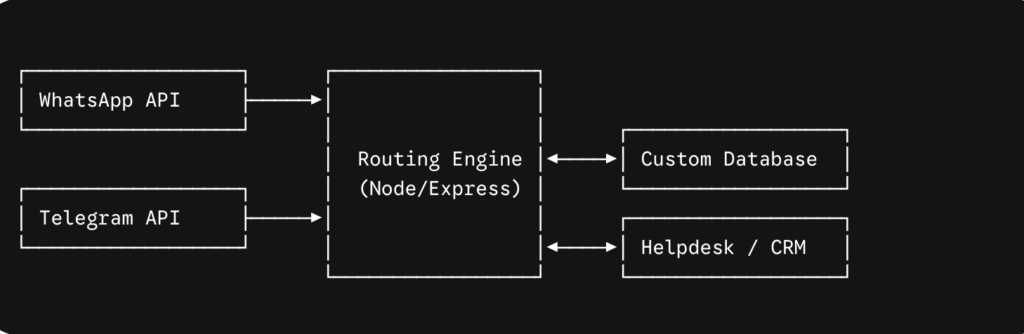
To optimize performance and avoid forcing agents to switch between separate communication interfaces, implement a unified Node.js/Express middleware layer integrated with a central PostgreSQL database.
1. Database Mapping Design
The backend database manages the state of different asynchronous dialogues happening in isolated external networks and simultaneously merges the identities into single internal customer profiles in a secure manner.
https://dbdiagram.io/d/your-diagram-id
2. Operational Webhook Ingestion Pipeline
The core routing engine processes multi-platform inputs through unified evaluation tracks:
https://gist.github.com/username/abcdef123456
3. Intent Resolution & Escalation Rules
Automated workflows be a kind of intelligent filtering mechanism.
They enable separating simple queries from more complex ones, at the same time they do not completely cut off the customers who wish to talk to a human agent.
https://gist.github.com/username/1234567890abcdef1234567890abcdef
Part 3: Production Security and Best Practices
Internal routing engines must be protected against unauthorized API calls or spoofed webhooks by strict implementation of transport verification checks:
Meta Signature Verification: Meta signs inbound WhatsApp payloads by appending an X-Hub-Signature-256 value to the request headers. You must locally compute an HMAC SHA256 signature using your application’s private WHATSAPP_APP_SECRET key and then compare the computed signature with the header string before running any database scripts.
Telegram Secret Token Safeguard: When you launch your bot’s first setWebhook semaphore operating registration pattern, submit a strong alphanumeric key-string as the optional secret_token attribute parameter. Make sure that all incoming payloads have the same token string in the X-Telegram-Bot-Api-Secret-Token header. Immediately discard any mismatched packets.
Operational SLA & Privacy Architecture: Categorize channels by the level of urgency you expect. Setting a first-response time target of less than 15 minutes is appropriate for real-time chat platforms like WhatsApp and Telegram. Never store or ask for sensitive account passwords or raw financial credit card tokens inside unstructured chat bubbles. When there is a need for authentication, provide the user with secure link routing patterns leading to an encrypted browser session.